 EN
EN Fake exchange support: how to verify a request

Contents
At a glance
Verify an exchange support request and protect your account if you shared a code, allowed remote access or sent cryptocurrency.
Before you contact support
Scammers posing as crypto exchange support call with warnings of a hack and ask for a code, a software installation or a transfer. They may know your name and quote a ticket number. Before following the request, end the conversation and contact the exchange through its app or website.
You need the official app or a known exchange address. If you have already given the caller control of your computer or phone, use another trusted device. The sections below cover what to do after sharing a password, code or funds.
The essential steps
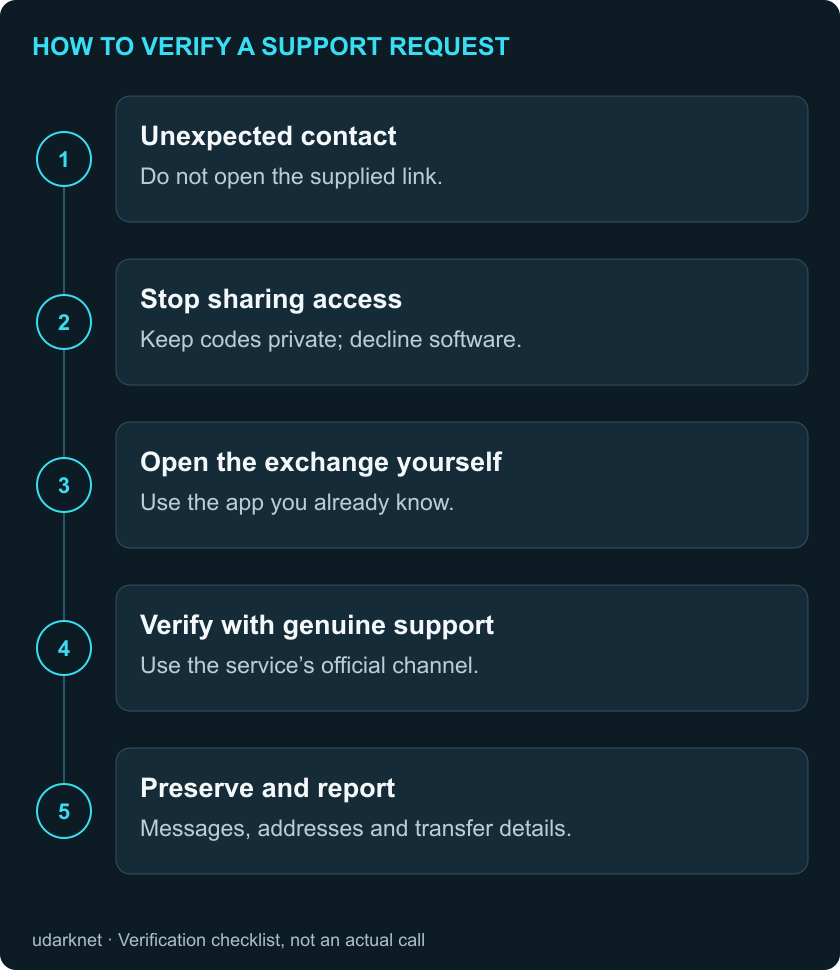
End the unexpected conversation. Open the exchange independently and verify the request with support. Until then, keep credentials private, decline software installations and do not transfer assets as instructed by the caller. If access has already been shared, proceed immediately to account and device protection.
How support impersonation works
The FBI/IC3 described this scam in an advisory dated 1 August 2024. The caller poses as an exchange employee, reports an account problem and pressures the owner to act. They then request login information or direct the owner to a page they control to gain access to cryptocurrency.
Record the ticket number and employee name so you can ask genuine support about them. A scammer can copy a logo and spoof a phone number, as Coinbase warns in its help pages. Verify the request even if the caller knows about your problem.
Step 1. End the conversation with the alleged agent
End the call or stop replying. “I will verify this through the app” is enough. Open the exchange after ending the conversation.
Record the service, alleged problem, ticket number and requested action. For example, “asks for a code to cancel a withdrawal” or “wants software installed to inspect the device.” Send that wording to genuine support with the ticket number.
Keep the message, sender address or phone number without opening attachments or following links. If you already see unauthorised activity, prioritise the exchange’s protection procedure. Collect screenshots after locking the account.
Step 2. Find the exchange’s genuine support
Use the previously installed app or a known official address. Avoid the caller’s link and phone number. The FBI recommends navigating separately to the exchange website and verifying through genuine contact details.
Do not simply choose the first support number in search. The FTC warns that fraudulent support providers can promote websites through search results and advertising. If the address is uncertain, start with the known app and its help section.
Open Help in the app and choose an available contact method. Some exchanges accept requests through chat or a form. If you cannot sign in, consult official help for recovery or account-locking instructions.
Step 3. Check the ticket and the agent’s request
If your account displays support history, compare the number, subject and contents. A matching number does not validate every instruction. If there is no history feature, open your own case through the official channel.
You can write:
Someone called claiming to be your employee. They quoted ticket [number], reported [problem] and asked me to [action]. Do you have this case? How should I check my account? I have not shared passwords or codes.
If information was shared, replace the last sentence with an accurate account. Do not include the actual password, one-time code or recovery phrase.
Wait for an answer through the channel you opened. Compare the action with the provider’s published procedure. Until support answers, put the caller’s requests on hold, even if they gave you a deadline. If there are actual signs of unauthorised access, use official account protection without waiting for a routine support response.
Step 4. Check requests for codes or device access
Coinbase expressly says support agents do not request passwords, two-step verification codes or recovery phrases. They do not ask customers to install software, remotely control devices or send cryptocurrency to an external address. These are Coinbase’s rules; check another exchange’s own documentation.
A two-factor authentication code, or 2FA code, provides additional confirmation of a login or action. Do not read it to someone or send it in chat. Where an official process requires a code, enter it only in the independently opened app or verified website, understanding the operation being confirmed.
During screen sharing, the caller may see balances, personal information or codes. It is unnecessary for verifying an unexpected contact. If asked to transfer to a “safe wallet,” stop following instructions and report the address and request to genuine support.
Example: “Read the code to cancel a withdrawal”
Consider a hypothetical call: “Funds are leaving your account. Ticket ABC-123. A cancellation code is coming; read it to me.” Keep the code private, end the call and independently open the app.
Review notifications and available transaction information. If unfamiliar activity appears, use official protection. If none appears, still submit the request for verification: an empty transaction screen does not authenticate the caller.
Include the ticket number and “cancellation code” instruction in your own case. Continue only through a confirmed procedure. Even a real exchange incident would not make an outsider’s transfer address trustworthy. This is a fictional example for practising verification.
If information or access was already shared
You only opened a link. Close the page and note whether you entered information, downloaded anything or ran a file. Tell support whether you viewed the page, entered information or ran a file. Access the exchange independently.
You entered a password or shared a code. From a trusted device, use the exchange’s protection process and report possible unauthorised access. The FTC recommends changing an exposed password, including anywhere it was reused, and enabling two-factor authentication. Review logins and transactions: the attacker may have used a one-time code to sign in or approve a transfer.
You installed software or allowed remote control. End the remote session; disconnect that device from the network if necessary. Use another trusted device to contact the exchange and change passwords. The FTC recommends updating security software, scanning and addressing detected threats; seek help from a trusted specialist or manufacturer if needed. Removing one application alone does not establish that access has ended.
You cannot sign in. Use recovery or emergency contacts in official help. Do not create extra accounts on the original sender’s instructions. Tell genuine support when you last had access and which suspicious actions you observed.
Coinbase account protection example
According to Coinbase help, the mobile route is menu → Account & settings → Security → Lock Account. Read the on-screen conditions before confirming. Labels can differ in translated interfaces; consult current help if the interface changes.
After confirming, look for the account-lock notification. Coinbase says locking signs devices out and restricts operations, while activity review and support remain available. If the procedure fails, use the official help route on the same page. Locking does not reverse completed transfers.
If funds have already been sent
Report the suspicious transaction to the exchange immediately. Preserve the asset, amount, network, destination, time and transaction identifier. Also called a hash, this identifier helps locate a transfer on the relevant blockchain. If unavailable, provide the withdrawal request number and status, then supplement the report.
Do not make another payment for “unlocking,” “tax” or guaranteed recovery. The FBI separately warns about offers to recover stolen crypto. Report through competent authorities in your country; IC3 accepts US reports and requests transaction information. Filing does not guarantee recovery.
For follow-up, build a private evidence folder, keeping original messages, transfers and case references separately. Do not publicly post identity documents or information enabling account access.
Before continuing to use your account
Open your own support case and check:
- You are communicating through a channel you found independently.
- Genuine support has confirmed the problem and applicable procedure, or accepted an impersonation report.
- You understand what you are confirming in the app and why it is required.
Keep your case number. If the agent’s answer is unclear, ask in the same chat before confirming anything. For calls from alleged police officers or investigators, use our crypto-fraud warning guide.
Frequently asked questions
Is an incoming call safe if I recently contacted support?
Check context and the provider’s procedure. Coinbase allows a callback after a disconnected support conversation. Password and code-sharing prohibitions still apply. When uncertain, return to an independently opened channel.
Can I trust a matching ticket number?
Use it to locate the request, then verify the contents and requested action with official support. A page supplied by the caller should not be your only verification route.
How can I distinguish identity verification from document theft?
Check official help and begin through the independently opened app or website. Do not send documents in the original chat before verification. Ask genuine support where and why an upload is required if unclear.
Is changing my password enough after remote access?
The device and account activity also need review. The FTC recommends security scanning and addressing threats. If you cannot assess the device, seek a trusted specialist.
Can an exchange reverse sent cryptocurrency?
Contact it immediately: intervention depends on transaction stage and circumstances. A created request, a sent transfer and received funds are different states. Support can clarify the status of your transaction; it cannot guarantee recovery of a completed transfer.
Evidence & sources
Source record: · Checked:
Record limits · Checked 31 October 2026. Evergreen guide using dated FBI/FTC advice and current Coinbase help; other providers may use different procedures.
- Source reported
FBI explains exchange-support impersonation and independent verification.
Supporting excerpt: FBI/IC3: exchange employee impersonation
Navigate to the official cryptocurrency exchange website separately.
FBI/IC3: exchange employee impersonation ↗ - Source reported
Coinbase describes prohibited support requests and a callback exception.
Supporting excerpt: Technical support and impersonation scams
Ask you to install software on your device.
Technical support and impersonation scams ↗ - Source reported
FTC warns of fraudulent support in search and advertising.
Supporting excerpt: How To Spot, Avoid, and Report Tech Support Scams
run their own display ads online
How To Spot, Avoid, and Report Tech Support Scams ↗ - Source reported
FTC explains credential and device protection after a scam.
Supporting excerpt: What To Do if You Were Scammed
Run a scan and delete anything it identifies as a problem.
What To Do if You Were Scammed ↗ - Source reported
Coinbase describes account locking and its operational limits.
Supporting excerpt: Lock or unlock your compromised account
Locking your account will sign you out from all devices.
Lock or unlock your compromised account ↗


Related reading

Build a private evidence folder for a crypto compensation claim
Organise payments, withdrawals and correspondence without exposing sensitive records to an unsolicited recovery service.
Read article : Build a private evidence folder for a crypto compensation claim
Verify a call or message claiming to warn you about crypto fraud
Real prevention programmes exist, but their names can also be copied by impersonators.
Read article : Verify a call or message claiming to warn you about crypto fraud
Chainalysis reports access to customer contact data
Chainalysis disclosed access to user contact and role data on 30 October. What the company says was affected, what remains unknown and how to verify follow-up messages.
Read article : Chainalysis reports access to customer contact data