 EN
Duplicati: encrypted backups, schedules and file recovery
Duplicati review: choose a backup destination, configure encryption and retention, understand storage costs and restore files to a separate folder.
What is Duplicati used for?
Duplicati creates scheduled backups of selected files and folders. It compresses and can encrypt the data before sending it to a local disk, NAS or supported remote storage. Its browser interface organizes the source folders, destination, schedule and retention settings into a backup job.
A backup retains earlier states so you can recover from an unwanted edit or deletion. That is a different workflow from keeping two working folders synchronized. Duplicati is useful when you want to choose the storage provider and recovery policy yourself.
| Item | Details |
|---|---|
| Platforms | Windows, macOS, Linux |
| Task | File encryption |
| Download source | Use the project’s official page and choose the build for your operating system. |
| Version and terms | Documentation and package options checked 15 November 2026. The open-source client is separate from optional commercial management services. |
Duplicati interface and illustrations
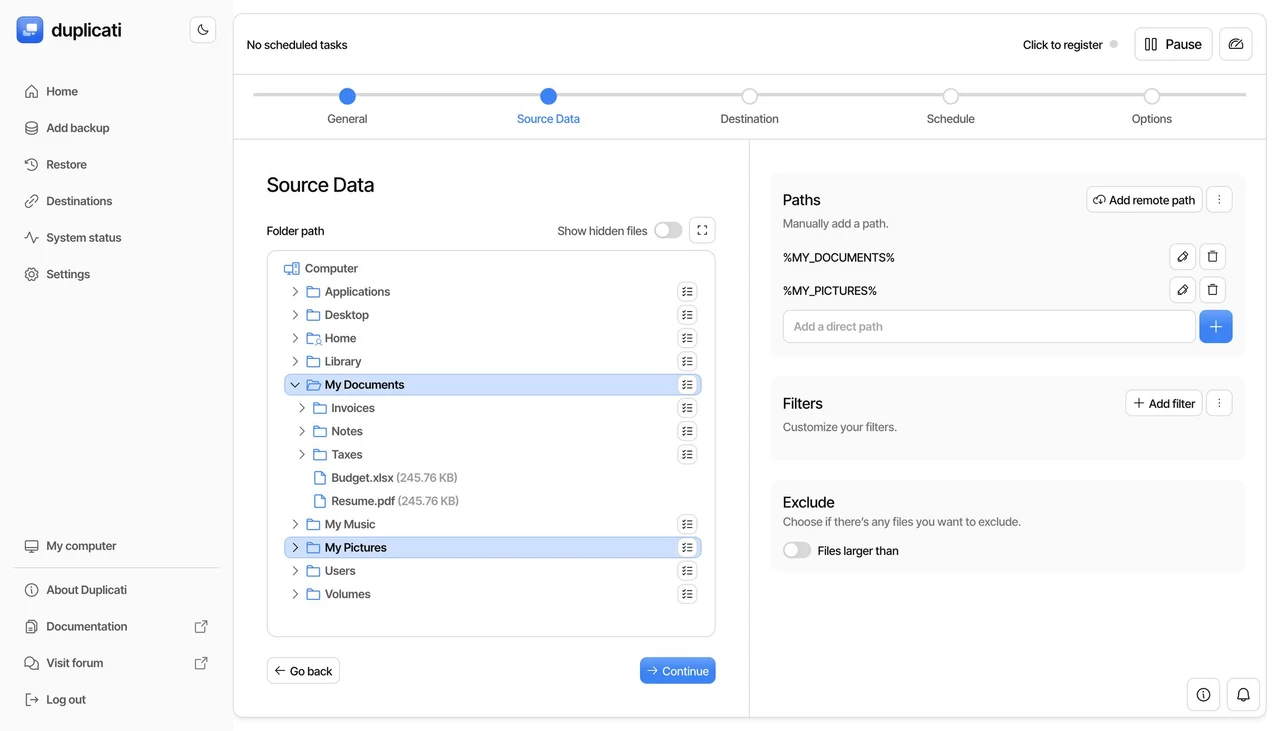
The official documentation illustrates the browser-based setup wizard. It separates general settings, source data, destination, schedule and retention. The screenshots show the developer's example configuration; storage names and available options depend on your setup.
Interface screenshots
Image sources are listed below. Other versions may have a different interface.
DuplicatiBackup setup wizard
1 of 1. Duplicati: Backup setup wizard
Download Duplicati from the official website
Choose the GUI package for Windows, macOS or Linux on the official download page. Match x64 or Arm64 to your processor. The documentation also covers command-line, Docker and remote-management variants for machines without a desktop.
Start with a small test folder and a dedicated destination path. Keep the encryption password and destination credentials outside the computer being backed up.
Getting started with Duplicati
- Install the appropriate package and open the local browser interface.
- Create a new backup job, choose encryption and save its passphrase in your recovery records.
- Select a dedicated destination and test the connection. Choose the folders to include and review exclusions.
- Set a schedule that can run while the computer is awake. Choose how long older versions should remain.
- Run the first backup and inspect its result and warnings.
- Open Restore, choose a version and recover a few files to a separate folder. Open those files and compare them with the originals.
Backups for a laptop, workstation or small office
A laptop owner can retain document history on remote storage; a small office can schedule separate jobs for working folders and archive exports. For a running database or application, first use its supported export or backup procedure, then protect the resulting files with Duplicati.
Choosing storage and estimating the bill
Duplicati supports several storage backends, including S3-compatible services, SFTP, WebDAV and local destinations. The backup client and the place that stores its files are separate parts of the setup. A free client does not make a cloud provider's storage or download traffic free.
| Component | Role | Cost to check |
|---|---|---|
| Open-source client | Create and restore backups | No client subscription |
| Local disk or NAS | Store backup volumes | Hardware and maintenance |
| Cloud destination | Store remote backup volumes | Capacity, requests and retrieval |
| Optional management console | Central oversight | Selected commercial plan |
Schedules, versions and source folders
The first backup transfers the initial data; later jobs can reuse unchanged blocks. Retention rules determine which older versions remain available. A longer history takes more space, especially when large files change frequently.
Choose the files deliberately
- Include the working folders you need to recover.
- Exclude replaceable caches and temporary data where appropriate.
- Export live databases with the application's own tools.
- Review job warnings and missed runs instead of relying only on the calendar schedule.
Recovering when the original computer is unavailable
The normal restore flow uses the configured job and its local database. Duplicati can also restore directly from backup files when you provide the destination details and encryption passphrase. Without the local database, it needs to download and process information from the destination, so recovery can take longer.
Keep a recovery record
- Destination address and account access.
- The backup encryption passphrase.
- An exported job configuration, stored privately.
- The date and result of a test restore.
Limitations and data protection in Duplicati
A backup stored only on a disk permanently attached to the same computer shares some of that computer's risks. Keep a separate copy or independently protected destination for important files.
Retention and storage limits affect how far back you can restore. Test recovery before depending on a new job, and keep its encryption passphrase available after device loss.
Alternatives for related tasks
Restic suits command-line automation; Kopia offers another backup-oriented workflow. Syncthing is better suited to maintaining working copies across devices. Duplicati's main advantage for this task is configuring scheduled backup jobs through a browser interface.
Questions and answers
Can I restore without the original job database?
Yes. Direct restore uses the remote destination and encryption passphrase, but may need more downloading and processing.
Does Duplicati include cloud storage?
The client can use storage you choose. Check the storage provider and any optional management service separately.
Where should a test restore go?
Use a separate empty folder so you can inspect the recovered files before replacing working copies.
Other tools for similar tasks

Kopia
Create encrypted file snapshots with KopiaUI on Windows, macOS or Linux. Choose storage, keep the repository password and test restoration before relying on a backup.
Review and setup →
Restic
Use Restic to save file snapshots, check a repository and restore a selected version to a separate directory on Windows, macOS, Linux or BSD.
Review and setup →
Syncthing
A practical Syncthing review: sync folders across your devices, choose folder modes, keep file versions and understand desktop and mobile options.
Review and setup →Related reading

Passkey, TOTP or SMS: protection of the exchange account
Selection of the method of entry and preparation of access recovery.
Read article →
Fake support for the exchange: how to check the request
Checking the access to the installation of programs and the transfer of access.
Read article →About the author

Crypto, fintech and Web3 expert with a background in marketing. Covers digital-asset projects, industry risks and fraud prevention.
Professional websiteDocumentation and images
Official sources, image credits and review methods
- Download Duplicati
- Documentation Duplicati
- Official documentation · docs.duplicati.com / installation
- Official documentation · docs.duplicati.com / restoring-files
- Official documentation · docs.duplicati.com / set-up-a-backup-in-the-ui
- Official documentation · duplicati.com / pricing
The review was prepared on the project documentation. The installation and independent testing of the distribution within this material was not carried out. The rights to the interface and the names are reserved for the respective rights holders.